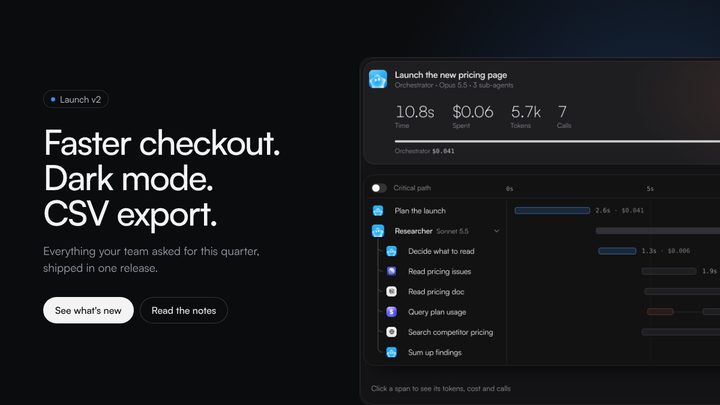
Workflow canvas
A workflow canvas is where people build an automation by placing steps and joining them with lines, then run it and watch each step light up as it works. Orvain's Workflow canvas family holds two: a workflow editor for a multi-step process across apps, with drag, insert, an inspector and a run played in place, and a flow connector where apps and an agent are wired port to port and the data can be seen moving along each wire.
The canvas has two jobs that pull against each other: editing, where the shape of the flow matters, and running, where the state of each step matters. These blocks keep one drawing for both. The same steps that were dragged into place show their run state, a waiting approval or a failed call is marked on the step itself, and retry or skip happens there, so a person never has to match a log line to a box.
Using Workflow canvas
Reach for it when
- Automations people design themselves, with branches, approvals and several apps.
- Processes that run often and fail sometimes, where seeing which step failed is the whole point.
- Connecting outputs to inputs by hand, where the wiring is the configuration.
Reach for something else when
- A straight sequence of three steps. A numbered list or a stepper says it with less to learn.
- An agent that decides its own steps. Use the Agents family, which shows the plan it chose rather than a diagram someone drew.
- A data pipeline measured in throughput. A metrics dashboard with error rates reads better than a canvas no one edits.
Where it shows up
Dispute handling
A Stripe dispute triggers a workflow that gathers evidence, asks finance before refunding, replies to the customer and logs the outcome. Finance approves on the canvas, and a failed refund is retried or skipped on its own step.
Weekly launch recap
Figma exports, Notion notes and an agent's summary are wired into a Slack post every Friday. Hovering a wire shows what it carries, and the post waits for an OK before it goes to the channel.
Questions
How should a workflow canvas show a running workflow?
On the same drawing people edited. Each step changes state in place, waiting, running, done or failed, and the lines that have been taken light up so the path through branches is visible. A step that needs a person shows its question on the step, and a failed one offers retry or skip there, with the run's status and elapsed time in the header.
Should people connect steps by dragging?
Yes, from an output port to an input port, with the line following the pointer and the valid targets marked while dragging. Offer a + on existing lines to insert a step between two others, which is the most common edit, and let a click on a line remove it. Keyboard users need the same actions from a step's menu.
Premium components,
free in your inbox.
Join the Orvain Dispatch and get production-ready components, free to keep: React and Vue code plus the Figma frame, yours to ship.


 Orvain MCP
Workflow canvas
A workflow canvas is where people build an automation by placing steps and joining them with lines, then run it and watch each step light up as it works. Orvain's Workflow canvas family holds two: a workflow editor for a multi-step process across apps, with drag, insert, an inspector and a run played in place, and a flow connector where apps and an agent are wired port to port and the data can be seen moving along each wire.
The canvas has two jobs that pull against each other: editing, where the shape of the flow matters, and running, where the state of each step matters. These blocks keep one drawing for both. The same steps that were dragged into place show their run state, a waiting approval or a failed call is marked on the step itself, and retry or skip happens there, so a person never has to match a log line to a box.
2 blocks
Using Workflow canvas
Reach for it when
- Automations people design themselves, with branches, approvals and several apps.
- Processes that run often and fail sometimes, where seeing which step failed is the whole point.
- Connecting outputs to inputs by hand, where the wiring is the configuration.
Reach for something else when
- A straight sequence of three steps. A numbered list or a stepper says it with less to learn.
- An agent that decides its own steps. Use the Agents family, which shows the plan it chose rather than a diagram someone drew.
- A data pipeline measured in throughput. A metrics dashboard with error rates reads better than a canvas no one edits.
Where it shows up
Dispute handling
A Stripe dispute triggers a workflow that gathers evidence, asks finance before refunding, replies to the customer and logs the outcome. Finance approves on the canvas, and a failed refund is retried or skipped on its own step.
Weekly launch recap
Figma exports, Notion notes and an agent's summary are wired into a Slack post every Friday. Hovering a wire shows what it carries, and the post waits for an OK before it goes to the channel.
Questions
How should a workflow canvas show a running workflow?
On the same drawing people edited. Each step changes state in place, waiting, running, done or failed, and the lines that have been taken light up so the path through branches is visible. A step that needs a person shows its question on the step, and a failed one offers retry or skip there, with the run's status and elapsed time in the header.
Should people connect steps by dragging?
Yes, from an output port to an input port, with the line following the pointer and the valid targets marked while dragging. Offer a + on existing lines to insert a step between two others, which is the most common edit, and let a click on a line remove it. Keyboard users need the same actions from a step's menu.
Related blocks
All blocksPremium components, free in your inbox.
Join the Orvain Dispatch and get production-ready components, free to keep: React and Vue code plus the Figma frame, yours to ship.